MPV
RIBFDAQは, common trigger & common dead timeを基本思想としている. サブシステム単位(多くの場合, VMEクレート単位)で処理が並列化されており, 全ての subsystem が共通のtriggerでevent dataを取得する.

RIBFDAQの構成概念図.
いずれかのsubsystemがbusyの間は, 全subsystemで次のtriggerを受け付けない. 全てのsubsystemのbusyが解除されるまでがdead timeとなる(common dead time)ため, 全体のdead timeは最も処理に時間がかかるsubsystemで決まる.

Common dead timeの模式図. 全subsystemのbusyが解除された後に, 次のtriggerを受け付ける.
従来型のVME読み出しでは, VME busを介して順番にmoduleのデータを読み出すため, module数に依存して読み出し時間が増加する.
MPVは各moduleごとに専用コントローラMOCOを搭載し, moduleから並列にデータを読み出す. また, MOCOのIRQ応答は20 ns未満であり, 通常のVMEコントローラに比べて極めて小さい. この結果, MPVへの置き換えによってDAQの大幅な高速化が期待できる.
VMEによる読み出し

通常のVME読み出し概念図.

VME bus を介して逐次的にmoduleからデータを読み出す.
MPVによる読み出し

MPVによる並列データ読み出し概念図.

MPVでは各モジュールから並列にデータを読み出す.
より詳しい説明は以下の資料を参照.
- H. Baba et al., IEEE Trans. Nucl. Sci. 68, 1841 (2021).
- https://openit.kek.jp/workshop/2020/dsys/presentation/mpv20201130_baba.pdf
I/O
Firmwareによって異なるが, 一般的に使われているMPVのI/Oは次.

MOCO
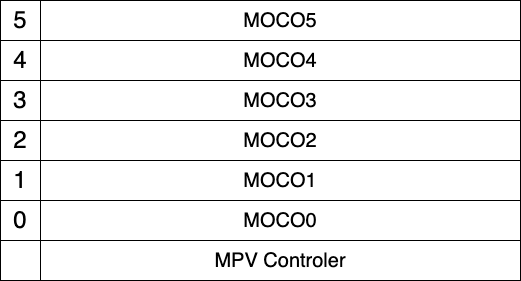
MPV controller 1 台につき, MOCOは6台まで読める. MOCOのIDは下から順番に 0, 1, ..., 5 .
MOCOに接続するVMEモジュールは base address を 0x0000 に設定する必要がある.
MPVCTRL
mpv にログイン後, mpvctrl というコマンドでmocoに接続されたモジュールと通信できる.
ssh root@mpv
単に mpvctrl と叩けば, helpが表示される.
root@mpv22:~# mpvctrl
 mpvctrl COM [params] ...

 COM =  status   : Read status
        enable   : Enable MOCO (moco0--moco5, ts, none)
        busy     : Enable busy member (moco0--moco5, none)
        trigger  : Set Trigger (in0-in1, clk1k, clk10k, none)
        nout0    : NIM Out 0 (eob, busy, ungated, gated, pulse, level, clk10k, debug0--3, clk100m, mbusy0--5, int25m, ext25m)
        nout1    : NIM Out 1 (eob, busy, ungated, gated, pulse, level, clk10k, debug0--3, clk100m, mbusy0--5, int25m, ext25m)
        nout2    : NIM Out 2 (eob, busy, ungated, gated, pulse, level, clk10k, debug0--3, clk100m, mbusy0--5, int25m, ext25m)
        nout3    : NIM Out 3 (eob, busy, ungated, gated, pulse, level, clk10k, debug0--3, clk100m, mbusy0--5, int25m, ext25m)
        level    : Level output (0x0X)
        pulse    : Pulse output (0x0X)
        start    : Start Run (default is common trigger, [notrg] = w/o trigger)
        stop     : Stop Run
        reset    : Reset Run (when Start Run, reset is automatically issued)
        softtrg  : Software trigger (moco0--moco5)
        com      : Issue command frame (moco0--moco5)
        frame    : set command frame for moco by raw values (moco0--moco5, 0xXXXXXXXX x 3)
        latest   : see latest data from moco (moco0--moco5)
        vread    : VME read (moco0--moco5, D16/D32 AM Addr)
        vwrite   : VME write (moco0--moco5, D16/D32 AM Addr Value)
        vcont    : set VME DAQ continuous readout mode (moco0--moco5, IRQ/TRG/DUMMY CNT D16/D32 AM Addr)
        rread    : RAW read (moco0--moco5, 0xXXXXXXXX 0xXXXXXXXX 0xXXXXXXXX)
        rwrite   : RAW write (moco0--moco5, 0xXXXXXXXX 0xXXXXXXXX 0xXXXXXXXX)
        mocorst  : reset moco (moco0--moco5)
        mocotimer : set timerwait for moco (moco0--moco5 TIME (20ns step, < 65535, 0=disable))
        mocovc   : Enable/disable variable count read (to disable, AM=NONE) (moco0--moco5, D16/D32 AM Addr Mask)
        mocoiack : Enable/disable Iack response (moco0--moco5, enable/disable)
        mocopr0  : Set Pre0 command (to disable, AM=NONE) (moco0--moco5, R/W D16/D32 AM Addr [Value])
        mocopr1  : Set Pre1 command (to disable, AM=NONE) (moco0--moco5, R/W D16/D32 AM Addr [Value])
        mocops0  : Set Post0 command (to disable, AM=NONE) (moco0--moco5, R/W D16/D32 AM Addr [Value])
        mocops1  : Set Post1 command (to disable, AM=NONE) (moco0--moco5, R/W D16/D32 AM Addr [Value])
        v1x90    : for V1190/V1290 OPCODE (moco0--moco5, QN/QR/QW OPCode [nR]/[Val] [Val] ...)
        scaler   : see scaler values
        currentts : check current TS value (upper 32bit)
        babiscr  : send scaler values to babildes
        test     : Send test command to available MOCOs
        user     : Send user command to all MOCOs
        busystat : see Busy status
        debug    : for debug puporse (value)
        help     : Help


  for command frame
     RST       : Reset MOCO
     IRQ       : IRQ driven mode
     TRG       : Trigger driven mode
     DUMMY     : Dummy command
     D16/D32   : D16/D32 mode
     R/W       : Read or Write
     CNT       : Maximum number of readout data
     AM        : AM code (A16, A24, A24BLT, A32, A32BLT, A24INC <= address increment mode, NONE)
     Addr      : VME Address (only lower 24bit)
     Value     : Value to be written (only for Write mode)
例:
mpvctrl vread moco<N> D32 A24 0x0018
mpvctrl vwrite moco<N> D32 A24 0x0000 0xffffffff
MAC Address
devtool/findbiid を使う方法
MPVをLANに接続して, 同一LANに存在するマシンで babirl/devtool/findbiid を実行する.
./findbiid
------------------
BIID = bbdaqsrv
IP   = 0.0.0.0
MAC  = 00:00:00:00:00:00
Host = onokoro22.gen
------------------

------------------
BIID = bbdaqsrv
IP   = 0.0.0.0
MAC  = 00:00:00:00:00:00
Host = onokoro00.gen
------------------

------------------
BIID = bbdaqsrv
IP   = 172.27.220.180
MAC  = 84:47:09:14:48:25
Host = onokoro03.gen
------------------
シリアルポート経由でログインする方法
screen /dev/tty.usbserial-AB0M7NK1 115200
mpv22 login: root
Password:
baud rate = 115200 を指定しないと, うまくいかない.
ログインできたら ifconfig でMACアドレスをチェック.
root@mpv22:~# ifconfig
MOCO への Firmware の書き込み
MPV controller でMOCOにファームウェアを書き込むこともできる.
Firmware mocotrion.hex を MPV controllerの /media/sd-mmcblk1p2 に配置する.
まず, mocoの flash memory が正しく認識されているか確認する.
mpvspi -m MOCO -i <moco id (0-5)>
MODULE = MOCO
 MOCO 0
res : 0 0xff
res : 1 0xef
res : 2 0x40
res : 3 0x16
res : 4 0x00
res : 5 0x00
res1 から res3 が次のようになっていれば, 正しくMOCOが認識されている.
res : 1 0xef
res : 2 0x40
res : 3 0x16
Firmwareは次のコマンドで書き込むことができる.
cd /media/sd-mmcblk1p2/
mpvspi -m MOCO -e -w <moco id (0-5)> mocotrion.hex
書き込みには1分ほどかかり, 書き込みが終わるとMOCO上のLEDが点灯する.
書き込みが終わったら, mpvctrl で正しく書き込めたかテストする.
root@mpv22:/media/sd-mmcblk1p2#  mpvctrl enable moco0 moco1 moco2 moco3 moco4 moco5
*** MPV Status ***
Firmware : 2.21
MOCO Status :
 MOCO0 : Enable Ready
 MOCO1 : Enable Ready
 MOCO2 : Enable Ready
 MOCO3 : Enable Ready
 MOCO4 : Enable Ready
 MOCO5 : Enable Ready
  TS   : Disable
Trigger Select : in0
Busy Select :
Level output : 0x0000
NIM Out 0 : gated
NIM Out 1 : clk10k
NIM Out 2 : int25m
NIM Out 3 : eob
root@mpv22:/media/sd-mmcblk1p2# mpvctrl test
test function
*** MPV Status ***
Firmware :
2.21
MOCO Status :
 MOCO0 : Enable Ready TestOK
 MOCO1 : Enable Ready TestOK
 MOCO2 : Enable Ready TestOK
 MOCO3 : Enable Ready TestOK
 MOCO4 : Enable Ready TestOK
 MOCO5 : Enable Ready TestOK
  TS   : Disable
Trigger Select : in0
Busy Select :
Level output : 0x0000
NIM Out 0 : gated
NIM Out 1 : clk10k
NIM Out 2 : int25m
NIM Out 3 : eob

MPOCO [0] Firmware = 2.17
MPOCO [1] Firmware = 2.17
MPOCO [2] Firmware = 2.17
MPOCO [3] Firmware = 2.17
MPOCO [4] Firmware = 2.17
MPOCO [5] Firmware = 2.17
MOCO0の位置に入れたMOCOにファームウェアが書き込めないことがあるが, その場合は他のスロットに挿し直せば書き込むことができる.